My robot vacuum cleans without the cloud now
I bought a robot vacuum (again…). The new one is a bit more modern. It cleans well, maps every room and wall in my home, and talks to a server I don’t control, with no button anywhere that says “stop doing that”. This is, yet again, the story of keeping the robot and cutting the cloud.
I did it once again, and it actually works. The robot runs entirely on my own network now, cleans exactly as before, and has no way to reach the vendor. The map and the app live on the robot itself, on my network, not on anyone’s cloud. The code I wrote to control it is linked at the end.
Why bother
Three reasons.
Privacy. The robot knows the layout of the apartment or house it cleans. It also has a camera, and could possibly send pictures anywhere it reaches on the internet. I would like that to stay at home.
The cloud can disappear. If the company shuts the server down, a lot of smart devices simply stop, even though the hardware is fine. I do not want a vacuum with an expiry date set by someone else.
Control. I want my home automation to talk to the vacuum directly, on the LAN, without an app account or anything else as the man in the middle.
What it was sending home
Before I touched anything, I watched what the robot talked to for about a week on a separate network. Just a router and DNS logs: which names it looked up, which addresses it hit, how often. A couple of short packet captures on top. I looked at the outside, the envelope, not what was inside.
You do not need to crack open the device for this. You watch the door, what is going in (and out), not the house. The traffic is encrypted, which cuts both ways: nobody in between can read it, and neither can I. I see who it talks to, when, and how much. Unfortunately not what.
In that week it reached a handful of servers, the real surprise was where. Anker is the parent brand, so I expected Asia. But almost all of it stayed in North America, on Amazon’s AWS cloud in the US: the data, the login and cleaning API, the updates, even the always-on message broker.
That broker is aiot-mqtt-us.anker.com. The robot holds it open and keeps talking even while parked on the dock doing nothing. It is the first thing to go quiet once the robot is on my own network.
And it was not only chatting. Every clean, the robot sent a floorplan, named room by room, plus a list of the furniture it recognised and where each piece stood. The layout of the apartment, sitting on someone else’s server.
Some of this is totally normal and expected. A cloud robot leans on the cloud for its app, and time and update checks are routine for anything online. The point was never whether it talks. It was whether I want it to, and to whom.
The photos it had kept
While working on the robot, I found something I did not expect. It had been taking photos while cleaning and saving them to its own storage. There is no switch in the app to stop it. Even with the data-sharing setting (“User Experience Optimization”) turned off, it still took around 80 photos every run.
To be clear what this is and is not: on my unit the photos stayed on the robot and were never uploaded. That is milder than what Paul Moore showed on eufy cameras in 2022, where images went to the cloud even with cloud features off. Mine stayed local. Still not what “off” should mean, and once the robot is on my own network with no way out, those files go nowhere anyway.
After that, this was not just about convenience any more.
Taking it local
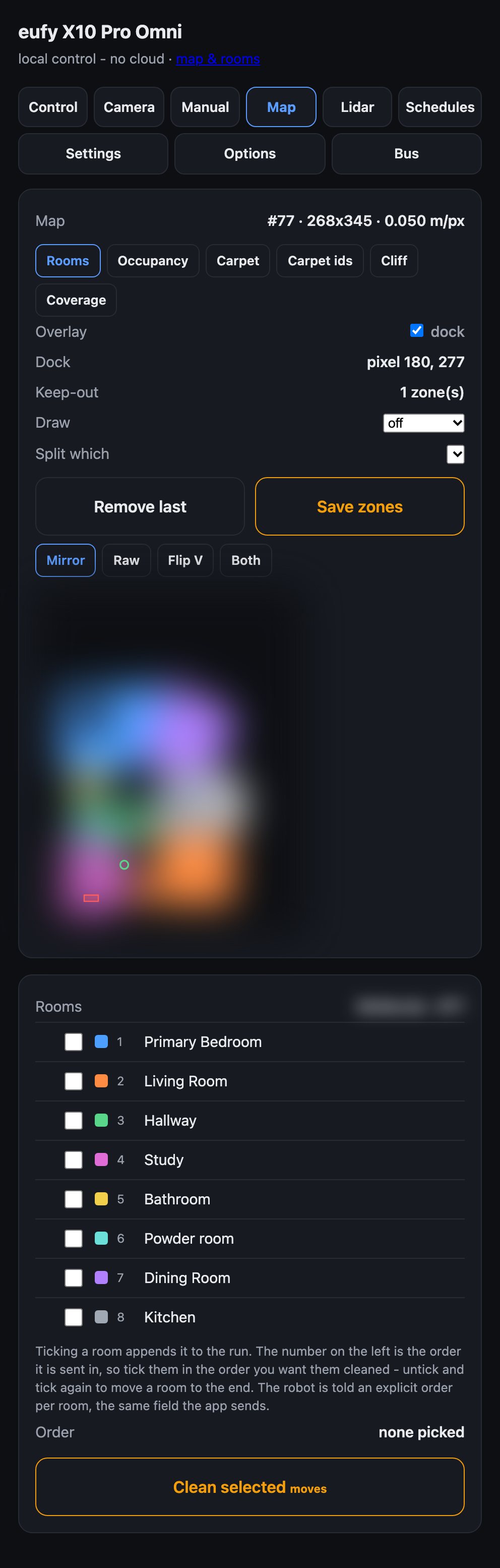
I did not use an off-the-shelf tool for this, because there simply was none. I wrote my own little app. With the AI tools around today this is not a huge task any more, as long as you have clear guidelines and a sense of the structure. Watching the robot’s connections, the commands going in and out, gave me a way to reuse the software that was already running and controlling the robot. On top of that sits the app that exposes the local interface, and that part is mine. The live map reuses the open Valetudo format. Valetudo itself did not support this robot when I checked, and I found its footprint too big to run on the bot anyway, so I took only the map format. The code is linked below.
This part is the what and the why. Getting in comes in part 2, kept general on purpose, because the steps differ per model and firmware and old ones can brick a robot. How I got the robot to listen to me and hand me an ssh shell in the first place is its own story, for the next blog.
What I lost is less than I expected. Most commands work locally, and with Home Assistant on top I have everything I actually use under my own control: cleaning, rooms, the live map, scheduling. From there I could wire up automations, say start it when everyone is out, or run the kitchen after dinner. A few of the robot’s own commands would probably still need the cloud, but I did not miss any yet. No app account in the middle any more.
One thing I am honestly not sure about: the camera-based obstacle avoidance. It feels a little off at times, and I never worked out whether it leaned on the cloud to begin with. Given what the camera was quietly up to, I am not sure I mind.
You can get most of this without rooting anything
You do not need to root anything to be a lot more private. Three steps, anyone can do them.
Put smart devices on their own network. Most routers have a guest or IoT (Internet of Things) network. If one device is ever compromised, it cannot reach your laptop.
Block the internet for devices that do not need it. A temperature sensor does not need to reach another continent. Watch first: a DNS filter like Pi-hole or AdGuard Home, which many people already run for ads, logs most of the names each device looks up. Then decide.
Choose before you buy. Before a device enters the house, check whether it can run locally at all: local control, open-firmware support, or Home Assistant without a cloud account. Picking the right device is far easier than fighting the wrong one for days, or even weeks.
But that is not always the way to go. Some devices genuinely need the internet - for a basic feature, for the right time so encrypted connections work, or for security updates. Block everything and you break things. Separate, watch, then block only what you are sure about. Or accept the loss of something and keep it offline.
Was it worth it
For me, definitely. Several weekends and evenings, against a robot that will keep cleaning no matter what happens to the company behind it, and now its map, its camera and all the other sensors (does it even have a microphone? I should probably check that…) do not land on anybody else’s cloud. Do I miss anything yet? Not really. I would do it again, right away, if only out of curiosity. Whether it is worth it for you depends on how much you want a vacuum that has only one master of disaster.
Next time: how I got in, and what it took to make the robot trust me instead of the cloud. Part 2 is up: My robot vacuum runs Linux. Here is how I got in.
The code is on GitHub: dhumpf/x10-ctl.