My robot vacuum runs Linux. Here is how I got in.
In the first post I talked about my robot vacuum that lives off the cloud and promised to come back and explain how I got in. The short version is almost boring: the robot runs Linux, basically a little single board computer with wheels and a dustbin, and once I got access to it I handed myself the keys to even more.
Once you know there is a whole Linux machine under the lid, cleaning your floors with a camera and a map of your home, it is hard not to want to see what it is actually doing in there. So I opened it up. What follows is how I went from a sealed appliance to a root shell, and what that taught me about how much the thing trusts the world around it.
The service port
Let’s start with the boring door. The one I used on purpose.
Almost every circuit board that leaves a factory has a service port. The factory needs a way to load the first software and check the thing boots before it goes in a box. Connect to it and you can watch the robot start up, and on a lot of boards talk to it while it runs. Nothing secret about the idea. Routers, smart plugs and most other gadgets have one too.
On the X10 there is no plug sitting ready. On the outside, under a taped-over flap next to the Reset and Wi-Fi buttons, there is a micro USB port. And behind a small window, hidden under some plastic, sits the board’s own debug port, bare pads with no connector fitted. That debug port is a serial console, a plain text window into the robot, and once I had wires on it, it was my way in. Finding it took a while. There is another port on the board with a connector already fitted, the obvious one, and I wasted time on that first. The right one I only pinned down with an oscilloscope on the pads and a bit of AI help translating the Chinese labels, and then I had to solder my own wires straight onto it. It still looked dead at first, until it turned out it just wanted one specific word before it would listen.
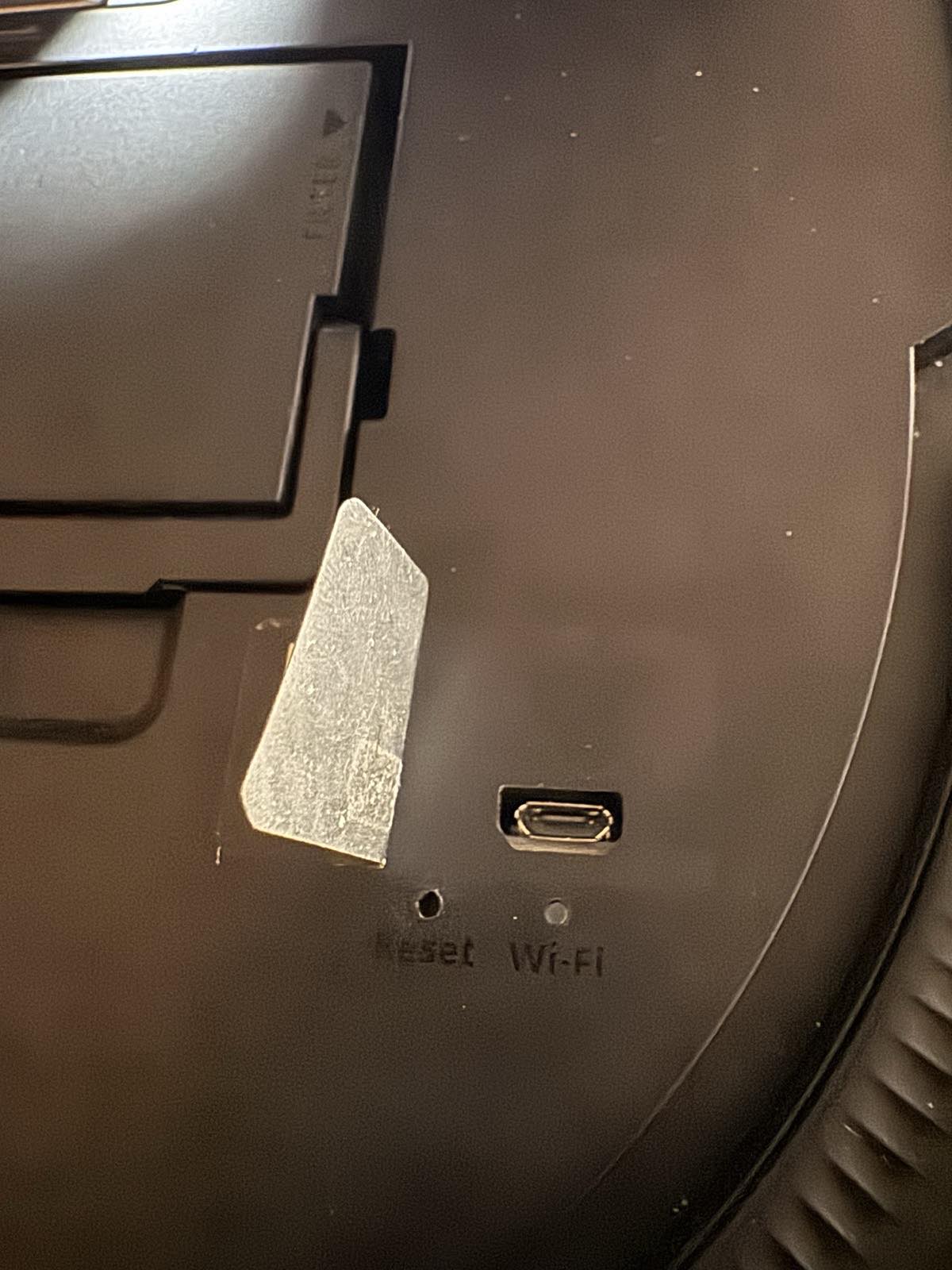
A few things before you think about opening yours. The warranty is gone the moment you do. Photograph every cable before you unplug anything. And this is not a clip-off-the-cover job - the debug port ships unsoldered, so there is some soldering involved, not just a screwdriver.
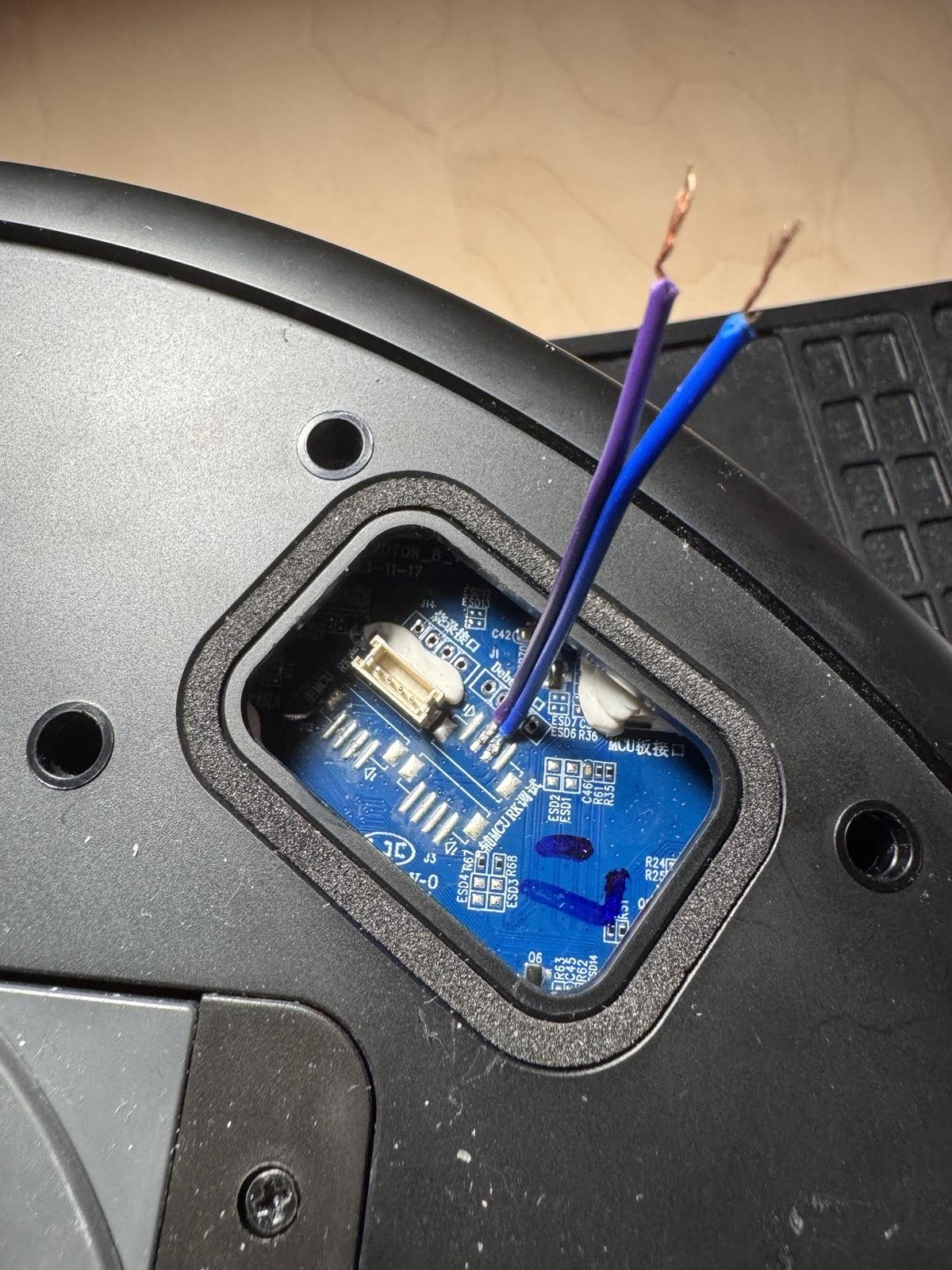
Here is the part that made the rest possible. The boot check is real, and then it stops. The bootloader and the kernel are verified. The rest of the system, the part that actually runs the robot, is not. So the robot can have a proper signature check and still be wide open once you are past that gate. That gap is the whole reason a change I write to its storage survives a reboot.
Getting root
Remember the port that looked dead. It was not dead. It was waiting for one word.
For a few evenings I had it wired up and it just echoed what I typed and ignored every command. The thing it wanted turned out to be three letters: fiq. Type that into the console and it flips into Rockchip’s fiq_debugger, a debug mode built into the chip family these robots use. Not really a secret, a documented feature, meant for debugging, and it hands you kernel-level access over the serial port. From dead port to inside the robot, just 3 bytes.
A debugger still is not a shell. It lets you poke at a running system, but not log into it. For that I needed its storage, and the robot handed that over just as easily. Its brain sits on an eMMC chip, basically a soldered-down SD card, and the bootloader has a mode called UMS, USB mass storage. One command, reset ums, and the robot offered its whole 7 GB to me over that micro USB, like a dumb thumb drive. The entire filesystem, with read and write access.
Before I changed anything I took a backup of the whole chip. That image is my insurance if I start breaking things. If anything bricks the robot, I write the backup back over the same USB connection and it boots as if nothing happened.
Then the way we got a door that survives every reboot. The running system is never checked, so the robot boots a changed version without issue. With the storage sitting there over USB, you can mount the system partition read-write and change files straight on the robot. I switched on a login that ships disabled, one commented-out line in its startup config, set a root password, unmounted, and powered it off and on again.
This time the console met me with a login prompt, and the password was mine. Root. uid=0, the account that can do anything on a Linux box. On my vacuum.
One shell on the serial wire is nice, but it means staying soldered to the board. So the last move was a way in over the network. I put a quick cross-compiled dropbear SSH server on /userdata, the one partition the robot carries across a firmware update. A reboot does not clear it, and neither does one of eufy’s own updates. From then on I had a root shell over Wi-Fi, the wires came off, and the robot went back together like nothing happened.
A quick warning if you plan to do this on your own bot. These steps are specific to this model and this firmware. Offsets and layout may shift between versions, and one bad write to the wrong partition turns a working vacuum into a piece of expensive electronic waste with no undo. So whatever you plan to do, do yourself a favor and take a backup first.
Making it mine
Root was never the point. It was the key. The thing I actually wanted is the one from the first post: a vacuum that cleans the place without reporting home, and keeps the map of my home at home. Getting root is what made that possible, so that story ran first and this one, how I got there, second.
The first thing root buys you is sight. The robot runs two buses of its own - one streaming over 500 channels of telemetry, the other carrying the commands that actually move it - and both only listen on the robot, never on the network. That is the real reason root came first. From a shell on the box I could finally watch it think, every topic live, with its own tools. The cloud out there only ever saw a small fraction of those channels. I could see all of them, and better, I could join in and manipulate them.
Once I could speak the robot’s own language, cutting out the manufacturer’s cloud was the obvious next step. I pointed its connection at my MQTT broker and gave it the answers it was waiting for. The robot never noticed the difference. That is where the little program from the first post comes from: the robot’s own map and controls, served on my network, with nothing phoning home.
That is also when I realised the debug port had been the hard way in. Once the robot was on my broker, I realised I did not need any of it. The robot trusts whatever cloud it is paired with, nearly all the way. It basically opens a root console to whichever broker it is paired to.
But it is worth sitting with what that means. The robot’s safety leans on one assumption: that nobody else ever gets to be the cloud it talks to. I asked eufy back in August, and never got a reply on whether that is intended or a bug they will eventually fix.